How to Find Meme Coins Early
Thousands of new tokens launch every single day. The ones that 10x rarely do so quietly. They usually show early signals in their onchain data: rising volume, genuine holders, real liquidity, and a pool that's been live long enough to prove it isn't a rug. The challenge is finding them before the crowd does.
GeckoTerminal's Mega Filter is built for exactly this. It lets you scan pools across 200+ blockchains and thousands of DEXes simultaneously, filtering by pool age, liquidity, trading volume, safety indicators, and more, so instead of scrolling through thousands of launches manually, you see only the ones worth your attention. To show you an example, you can try a simple version of the mega filter below.

What is GeckoTerminal’s Mega Filter?
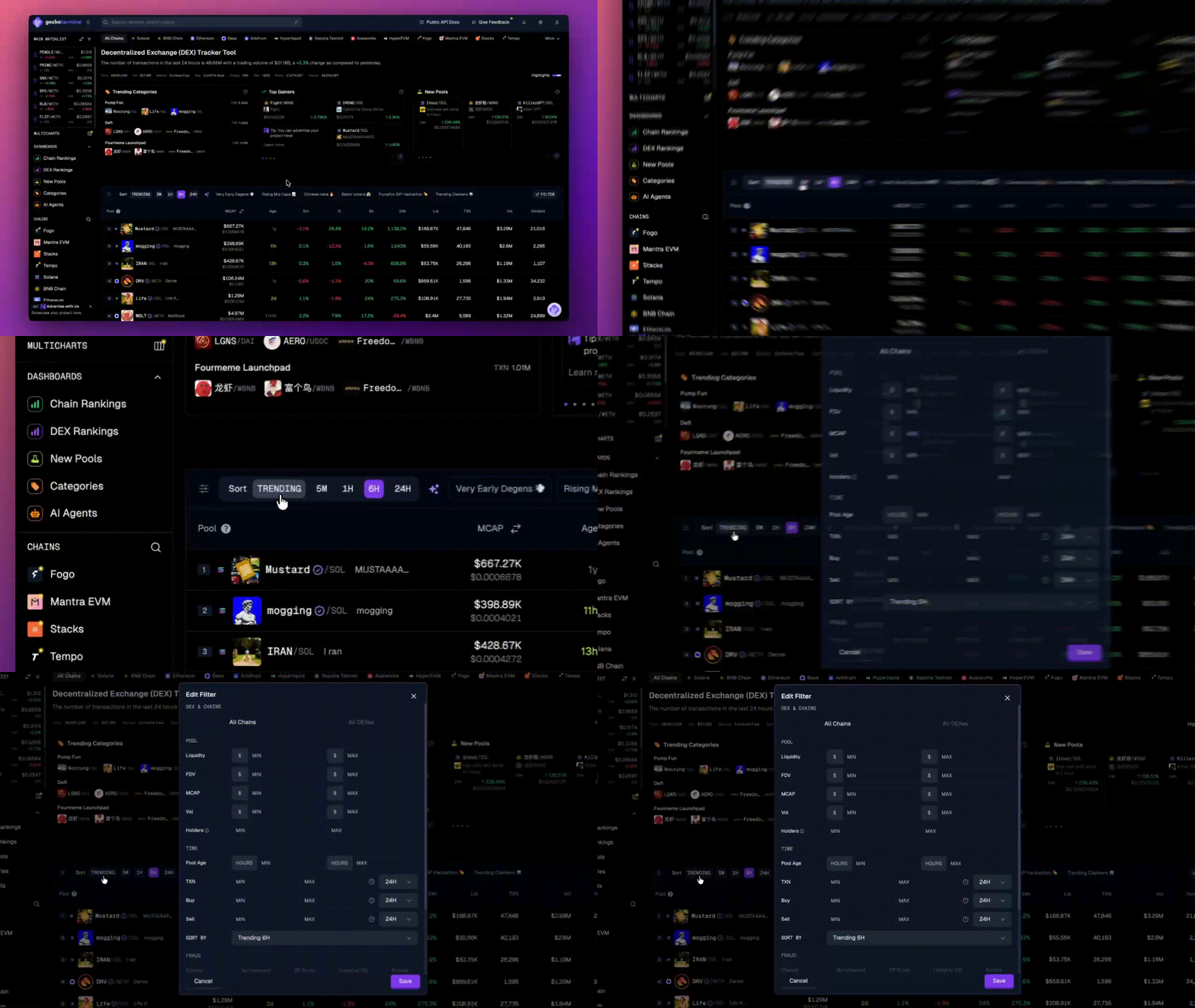
The Mega Filter is GeckoTerminal's advanced filtering tool that helps you scan and analyze pools across multiple blockchains and DEXes simultaneously. Instead of manually checking each new token launch, you can set custom parameters to surface only the pools or new meme coins that match your investment criteria.
Key filtering capabilities:
Pool age (find launches from the last hour to several days)
Liquidity and market cap thresholds
Trading volume and transaction activity
Safety features (honeypot detection, GT Score, holder concentration)
Chain and DEX selection
Sort by Top Gainers, Trending, Highest or Lowest Market Cap, FDV, Liquidity, and more
Step-by-Step Guide: How to Find Meme Coins Early with GeckoTerminal’s Mega Filter
Step 1: Start with Preset Filters
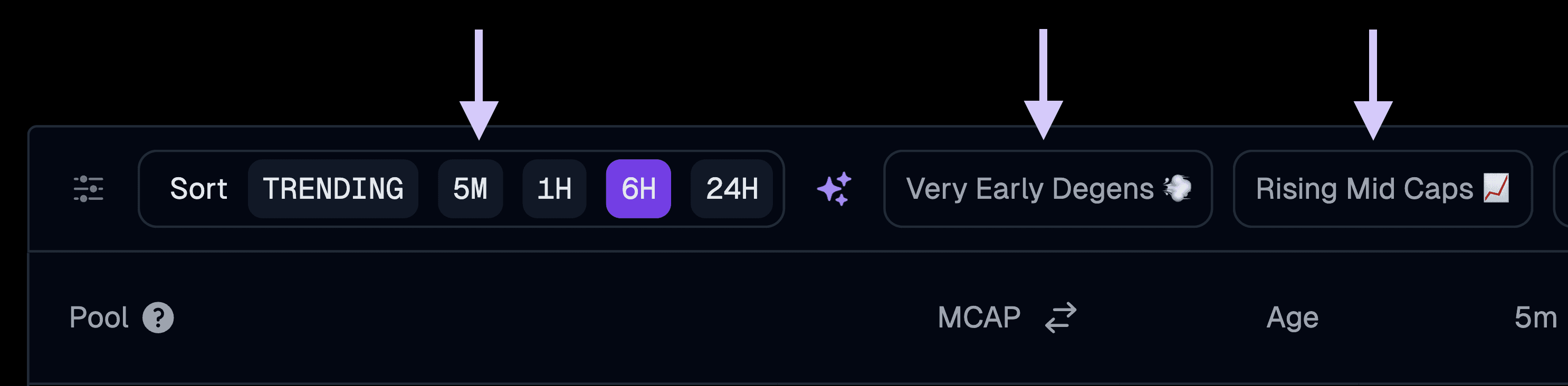
On GeckoTerminal’s homepage, you'll see preset Mega Filter options above the pool list.
Recommended presets for new meme coin hunting:
"Very Early Degens" - Pools created within the last 48 hours with minimum $10K liquidity, FDV over $80K, and at least 30 transactions in the last 24 hours. Use this to find brand new launches
"Rising Mid-Caps" - Pools created within the last 72 hours with minimum $100K liquidity, FDV over $2M, transaction volume over $50K, and at least 500 buy transactions in the last 24 hours to show proof of activity. These tokens are likely to have survived the initial launch phase and started showing substantial momentum and volume growth
"Trending" - Filter by 5 Minutes, 1 Hour, 6 Hours, or 24 Hours to see which pools are popular right now
Step 2: Customize Filters by Chains, DEXes, and Other Metrics
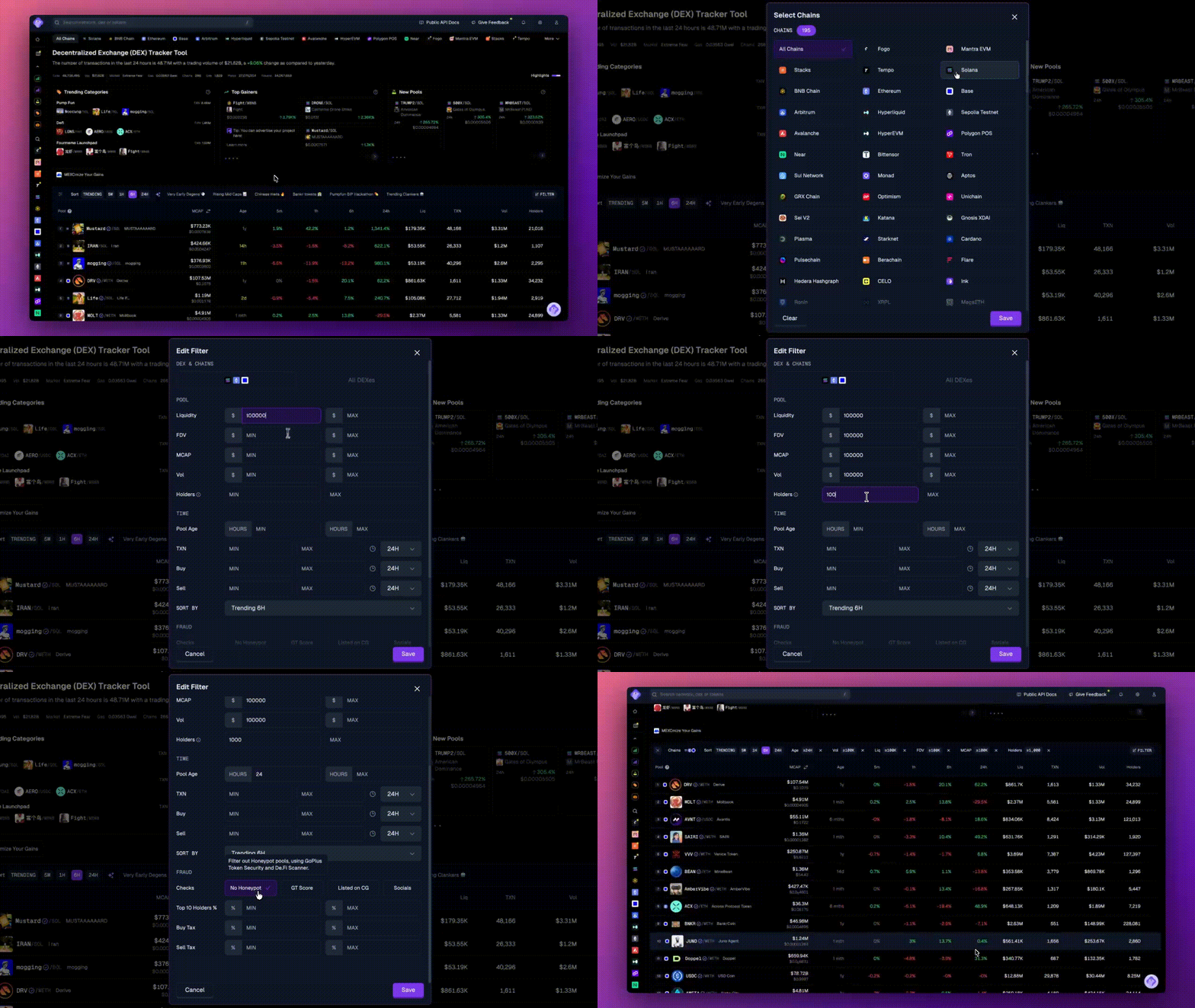
Click the "Edit Filter" icon at the top of the pools list.
Select your target chains:
Ethereum: Highest liquidity but expensive fees
Base/Solana: Popular for new meme launches with lower fees
BSC: High volume of daily launches
Default "All" casts the widest net
Set your metrics based on your research criteria:
Liquidity: Filter by minimum and maximum liquidity amounts. Higher liquidity generally means easier entry and exit from positions
FDV (Fully Diluted Valuation): Set ranges that match the stage of projects you're researching. Lower FDV typically indicates earlier-stage tokens
Market Cap: Define your target market cap range based on what qualifies as "early" for your analysis
Volume (24h): Minimum volume thresholds help identify pools with actual trading activity versus inactive or wash-traded pools
Pool Age:
0-24 hours: Very new launches
2-7 days: Pools with some trading history
7+ days: More established pools
Apply safety checks:
Enable "No Honeypot" to filter out tokens where you can buy but can't sell
Enable "GT Score" check to show only pools with a score of 75 and above
Option to show pools with tokens listed on CoinGecko for additional verification
"Socials" check will display only pools where social links and token information have been provided
Set Top 10 Holders % limits - Higher concentration of holdings among top wallets may indicate increased rug pull risk
Adjust these parameters based on what criteria matter for your research and risk assessment.
Step 3: Apply Filter and Analyze Results
Click "Save" to generate your filtered pool list.
Quick analysis process:
Sort by "Volume 24h" or "Transactions 24h" to see the most active pools
Check 24h % change for momentum indicators
Look for rising volume trends (growing interest)
Click on promising pools to review detailed metrics
For each promising pool, verify:
GT Score and security audit results
Holder distribution (no single wallet controlling a huge percentage)
Liquidity lock status
Pool creation date aligns with project claims
Ready to discover new meme coins before they explode? Head to GeckoTerminal and start using the Mega Filter today. Your next 100x might be just one filter away.